
Rate limiting is one of the most common levers used in guest and public Wi-Fi, and it is the wrong choice.
You turn on rate limiting in an attempt to stop one heavy user ruining the network for everybody else. That is a reasonable thing to want. The limit is set in megabits per second, checked in megabits per second and reported in megabits per second, so megabits are the unit everyone ends up reasoning in.
That is the wrong unit, and using it hides the entire efficiency penalty.
A WLAN does not spend megabits. It spends airtime, and airtime is consumed per transmission, not per byte. The question is not how fast a client is allowed to go. It is how much data the access point carries each time it takes the medium.
I measured that on a UniFi Express 7, on 5 GHz and 6 GHz, six repetitions of every condition, with the capture taken on the access point itself.
Aggregation does not shrink. It stops.
An access point pays the same fixed cost every time it transmits. It contends for the medium, sends a preamble and a header, delivers the payload, and collects an acknowledgment. That cost does not shrink when the payload does.
Frame aggregation exists to spread that overhead cost. The radio gathers whatever frames are waiting and sends them all under one preamble, so one trip to the air carries many frames of data in a single Transmission Opportunity – or TxOP.
With no rate limit applied, 99.7% of the access point’s downlink frames went across the air in an aggregated frame, sharing a trip with sixteen others on average.
At a 2 Mbps rate limit, only 3% did.
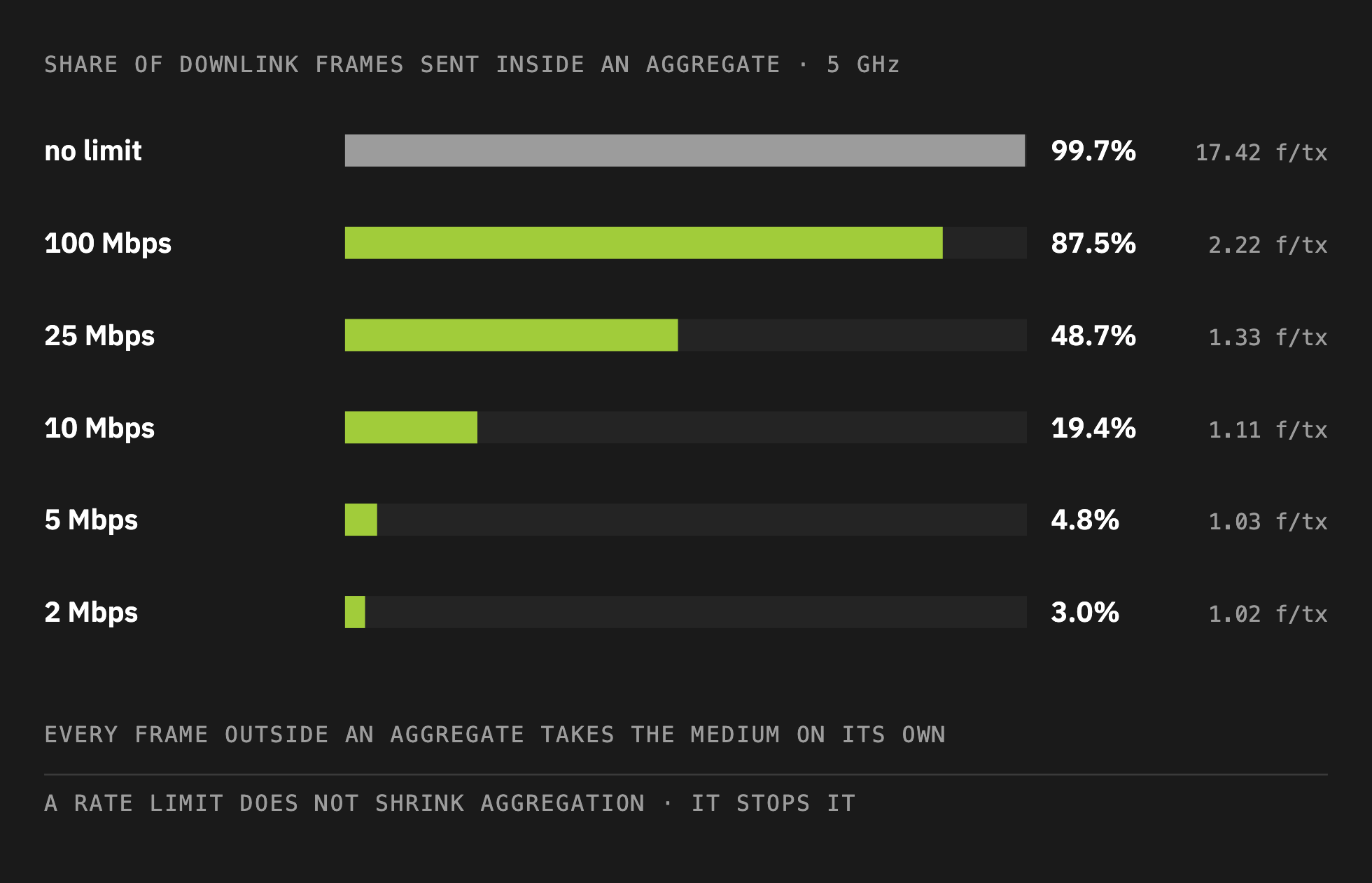
The other 97% each took the medium alone. One contention win, one preamble, one acknowledgment, for one frame.
A limit set in megabits per second did not make the radio send smaller aggregates. It made the radio stop aggregating.
Most of the cost arrives at a setting most would call generous
Count every transmission and divide by the data delivered, and you get trips per megabyte.
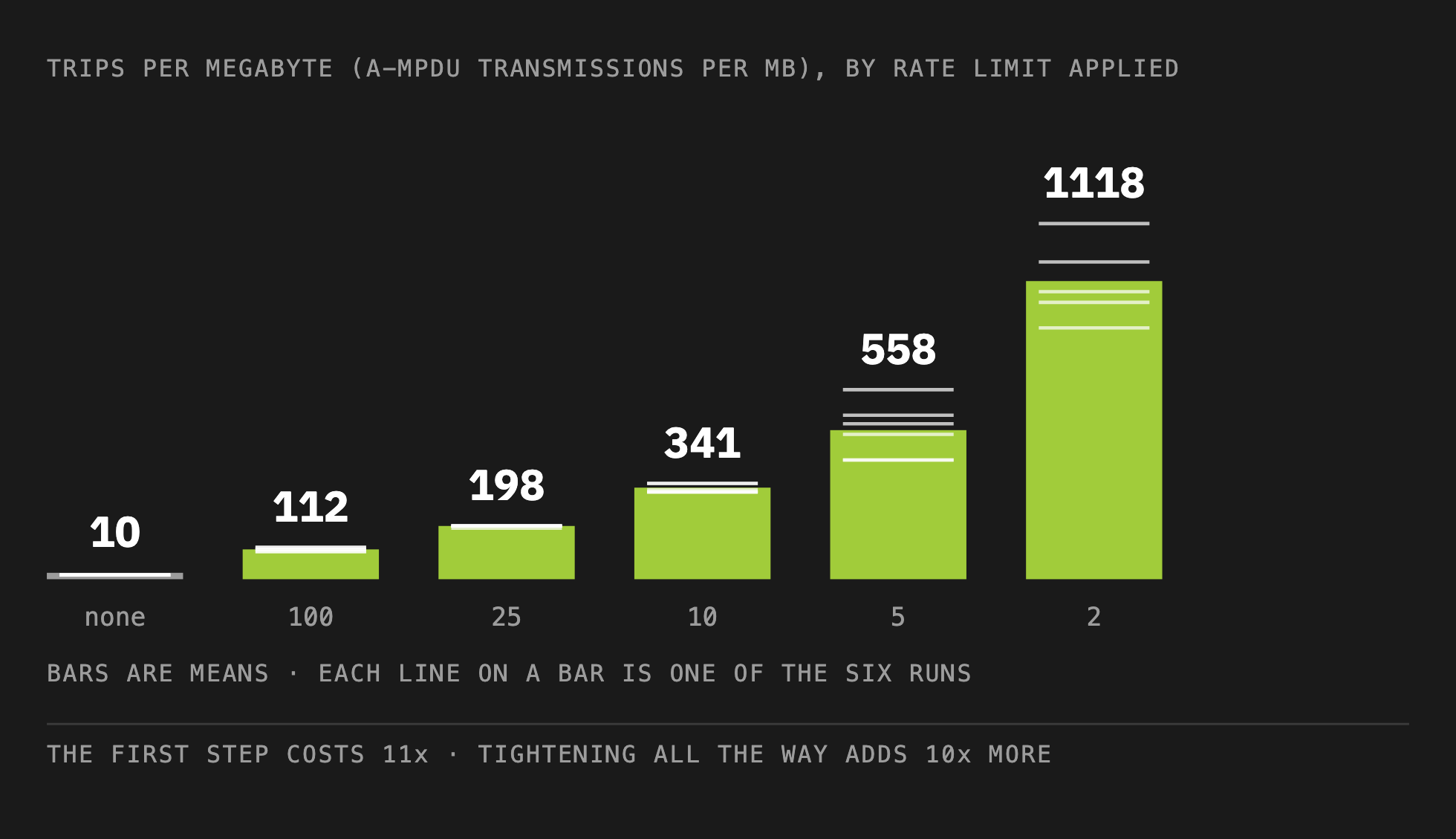
The data was 620 Mbps – yeah measured in Mbps. With no limit it needed about ten trips to move a megabyte. By turning on a 100 Mbps rate limit, which most engineers would call generous, it needed a hundred and twelve trips!
Making the rate limit more constrained doesn’t make it any better. At 2 Mbps the same megabyte took more than eleven hundred trips.
Switching the feature on costs you, and tightening it costs you again. There is no setting at which rate limiting improves RF airtime, none.
Every routine check says the network got healthier
This is the part to remember next time you are troubleshooting.
As the rate limit tightened the penalty to airtime efficiency climbed, yet the retry rate fell, on both bands, roughly by half.
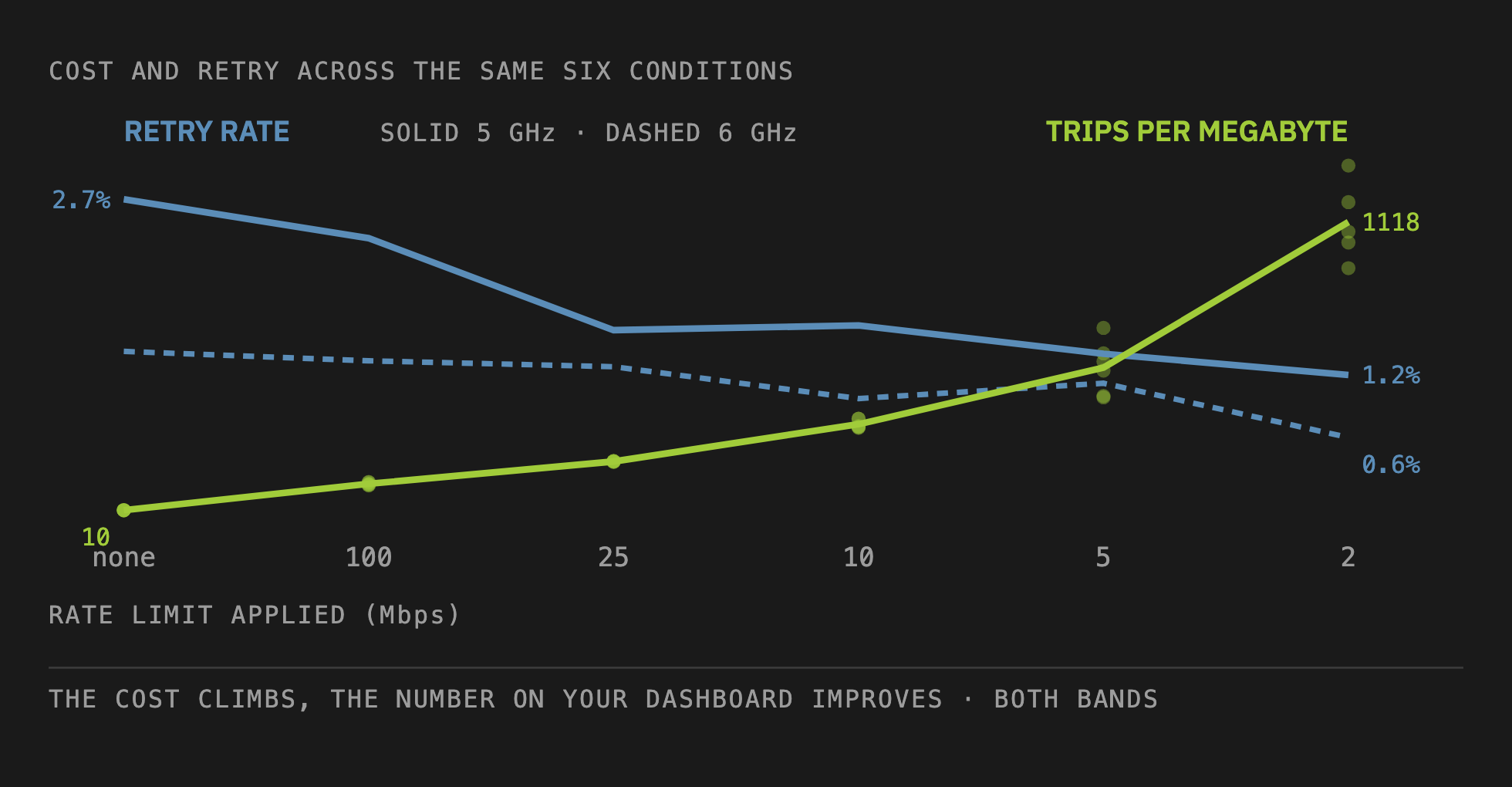
Signal does not move. Channel does not move. Client count does not move. Retry improves. Every box an engineer would tick after enabling a rate limit gets ticked.
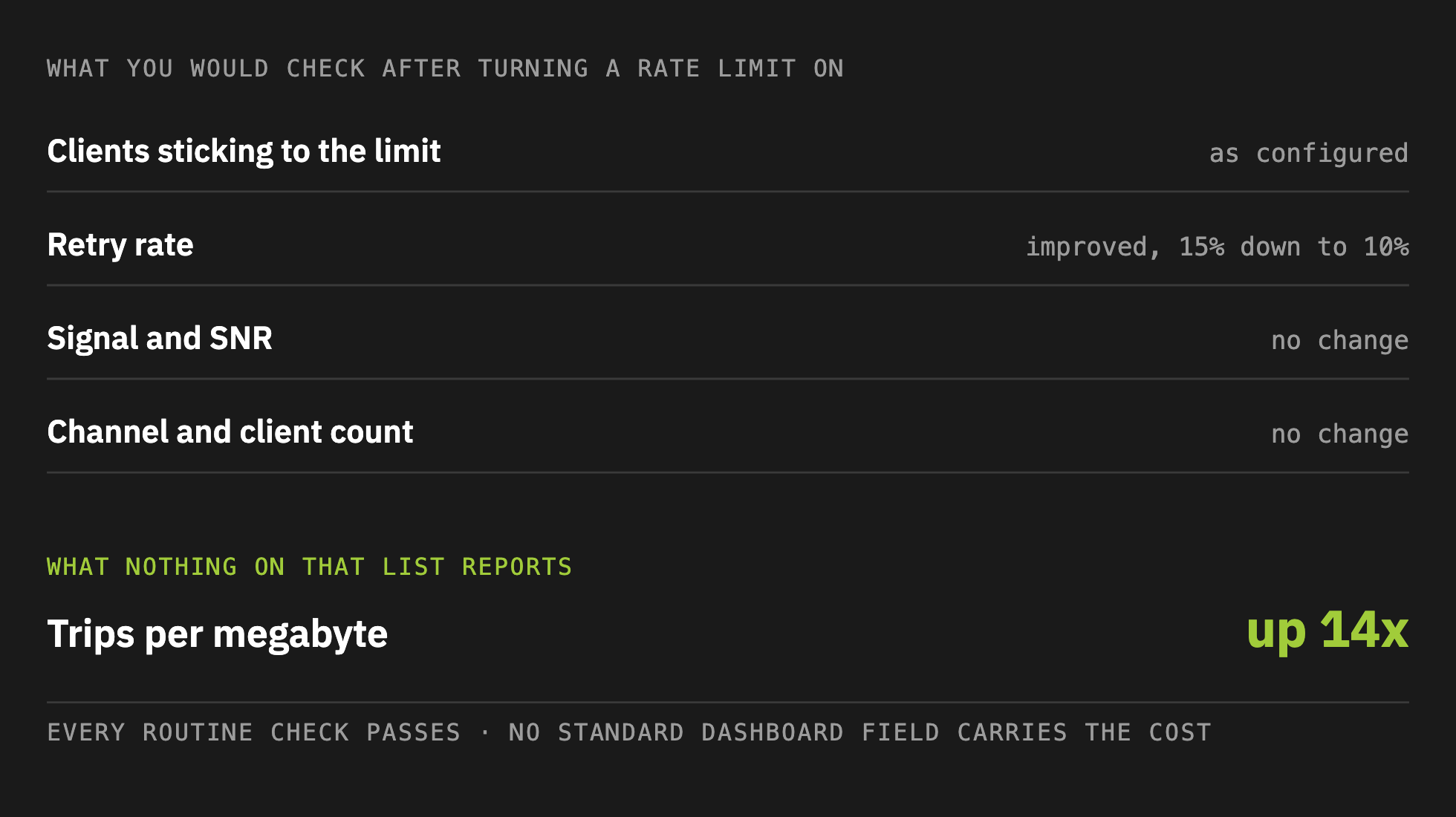
You might reach for channel utilization, which is the one field that may have shown this. On the access point I tested it sat flat much of the time, since we had only one client on that access point doing mostly downstream iPerf testing, so there was very little contention for the medium and thus the channel utilization number was not at all instructive.
Nothing on the dashboard reports the TxOP penalty that got dramatically worse.
Two clients, one radio, one instant
The obvious objection to any before-and-after test is that something else changed in between. So I ran two clients against the same access point at the same moment, for 45 seconds, six times, and took both out of a single capture. One was rate limited to only 10 Mbps. The other was not rate limited at all.
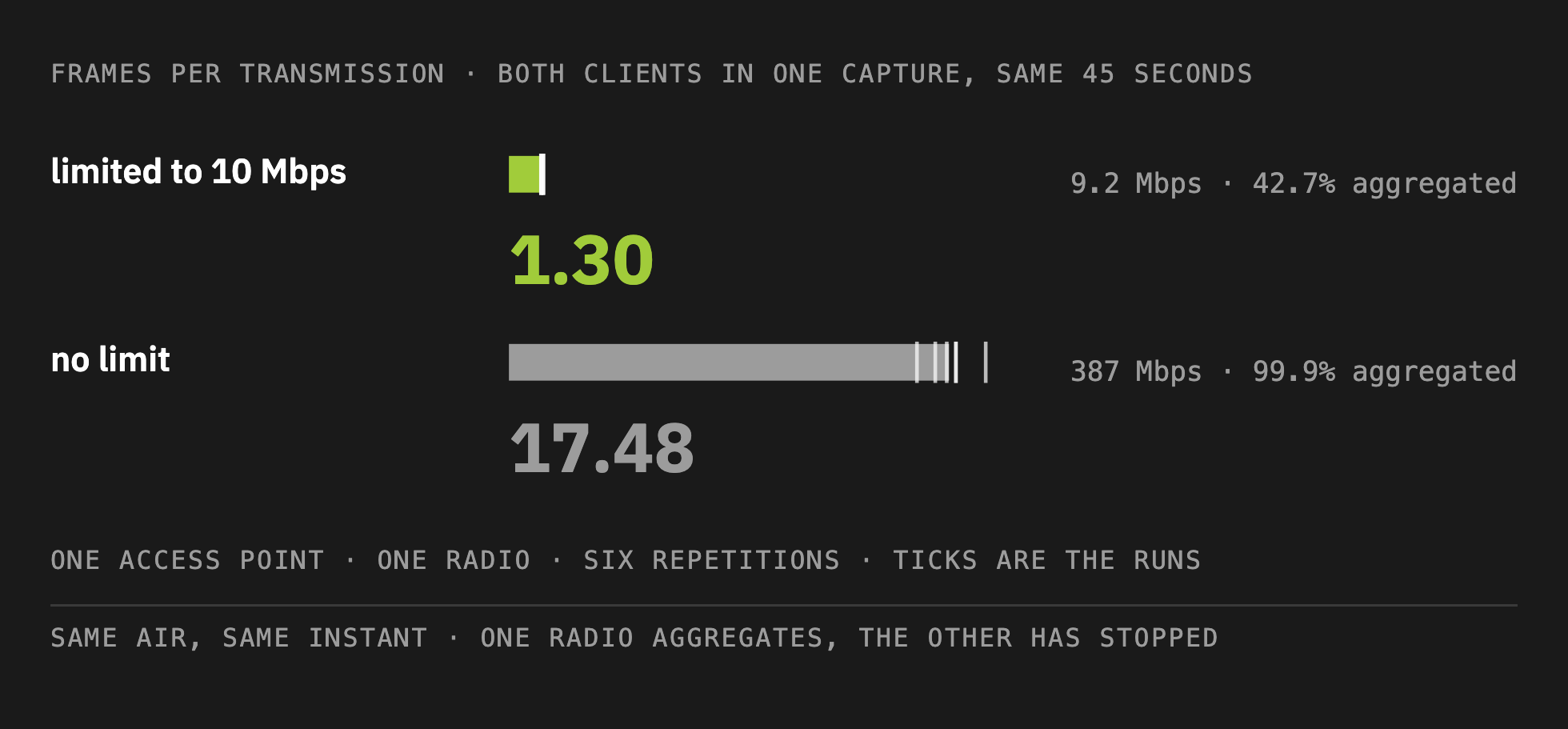
99.9% aggregated against 42.7%, in the same air, in the same instant.
There is a trap in the same data. The cell average across both clients was about 16 frames per transmission, because the unlimited client dominates the total. An engineer reading a per-radio summary would see a healthy number and conclude the limit cost nothing. Report by receiver address, not by average mixed between rate limited and non-rate limited client devices.
6 GHz helps, and it is not a way out
The obvious question is whether a newer band behaves differently. Same access point, same client, same night, both bands at 80 MHz.
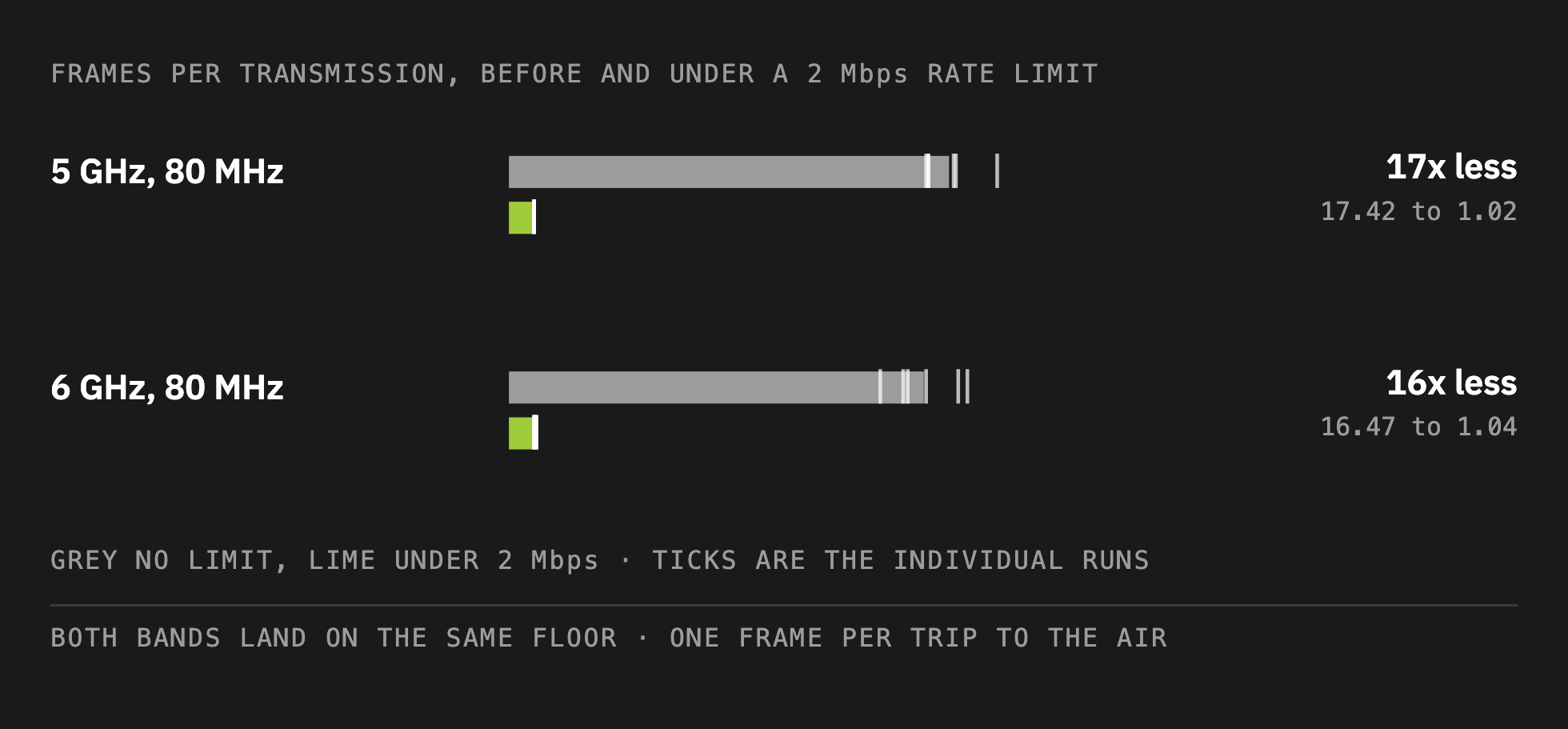
6 GHz gives up slightly less, and that is the extent of the good news. 6 GHz holds its aggregation a little better through the middle of the range, and by 2 Mbps that advantage is gone.
Moving to 6 GHz buys you a great deal. It does not buy an exemption from this TxOP inefficiency penalty.
The rate limit was not enforced where its name suggests
On this platform the downlink limit is written onto the client’s user group, which reads as though it travels with the wireless client.
It does not. It is enforced at the gateway, on the routed path.
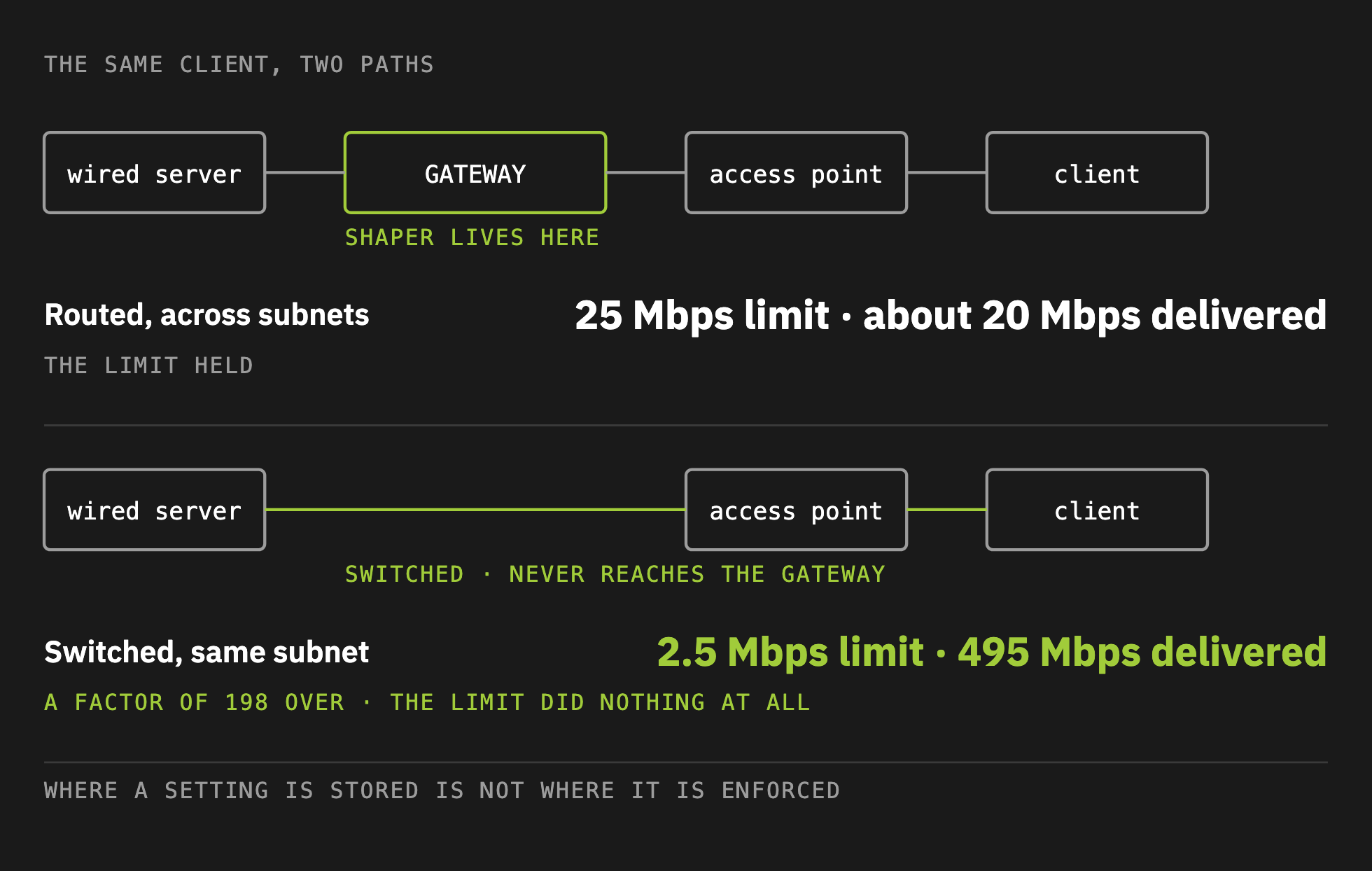
On a switched path between two hosts on the same subnet, a 2.5 Mbps limit delivered 495 Mbps, a factor of 198 over its setting. Put your load generator on the same VLAN as the client and you will build a rate-limited test that is not rate limited, with nothing in the output to tell you.
What this does not establish
We did not measure the total physical airtime using clock time. Trips per megabyte is a count of transmit opportunities. We priced the total penalty based on how many TxOP opportunities were needed to send a fixed amount of data. Control and management overhead airtime per megabit rose by up to 168 times, which is real measured time, and it still is not the total. A hundred times the trips is not a hundred times the airtime, and nobody should quote it that way.
I measured the rate limit penalty as waste. Nothing here puts a number on what this costs the users of a busy cell. On a radio with idle time to spare, the waste comes out of capacity nobody was using that second.
One access point, and one model of it. Whether this appears on other UniFi models, let alone other vendors, is not established by this work.
The same limit does not cost the same. On identical hardware the result varied by about half again between sittings, tracking the retry rate. Any result reported without its retry rate cannot be compared against these.
What to do about it
Stop rate limiting your Wi-Fi.
A rate limit controls megabits. An access point never runs out of megabits. It runs out of airtime, and a feature that makes the radio take the medium once per frame is spending airtime on overhead instead of on delivering data in a timely manner.
I do not have a better answer yet, and I am not going to pretend I do. The reason you turned the limit on has not gone away. One client really can take more than its share of a medium everybody has to take turns on, and something should deal with that. What I can tell you is that this seemingly benign rate limiting setting does not achieve its goal without a huge penalty. And yet, that penalty is totally invisible on every screen Wi-Fi professionals would think to check.
What to use instead is a real question and it needs its own measurements, not merely these results from my testing. I am still working on this issue.
If you are going to turn on rate limiting, do it knowing the penalty you are inflicting on your airtime. Do not trust any dashboard to tell you how it went, because it will tell you the opposite. Measure the share of frames still being aggregated, by receiver address, which is the clearest single indicator and sits in any capture taken at the access point. NOT over the air packet captures – since they are also flawed when compared with what the access point actually transmitted.
Run these tests on your own gear and tell me what you find, especially if you disagree.
The full white paper, with the complete method, the raw numbers and every caveat stated, is available as a PDF.
So here is what I would like to know: if you rate limit clients on your network, what made you choose the number? And has anyone ever gone back and measured what it bought you?