
After nearly twenty-five years working in wireless LANs, I’ve learned that the hardest part of troubleshooting usually isn’t the diagnosis, it’s having the right tool in the bag when the problem shows up. For most of my career, the wireless professional’s field kit was fairly predictable: a laptop, a survey adapter or two, a spectrum analyzer, a handheld tester, laser range finders, too many dongles and cables, and a backpack that seemed to get heavier every year. The tools worked, but the workflow was not always elegant. Today, the tooling landscape is changing quickly. We now have serious iOS-centered workflows, purpose-built survey sensors, compact spectrum tools, handheld validation platforms, and software that tries to translate RF complexity into something a frontline technician can act on.
That is good news, but it also creates confusion. These devices are not easily interchangeable. Some are built for survey-grade measurements. Some are excellent for quick validation. Some are best for scanning and beacon-level inspection. Others are designed for “is it Wi-Fi, LAN, DNS, DHCP, or Internet?” triage. An experienced WLAN professional needs to stop asking, “Which tool is best?” and start asking, “Best for which job, performed by whom, with what level of required evidence?”
The temptation, especially when you see a new gadget on a vendor’s website, is to buy what looks cool. The better question is always: what problem am I trying to see? Coverage, interference, roaming, throughput, and authentication all leave different fingerprints, and they all benefit from different tools. Let’s walk through the realistic options and the framework I use to decide which one comes off the shelf.
Note: Sadly, I do personally have a problem in NOT buying all the cool new tools. My wife thinks it is a disease.
Start With the Problem, Not the Product
Before you pick up anything, classify the symptom:
- Coverage / signal: Where is the AP, how strong is it where the user sits, and is the SNR usable? Are the client devices transmitting at a good MCS?
- Spectrum / non-Wi-Fi interference: Is something not-Wi-Fi stomping on the channel?
- Co-channel / adjacent channel: Are too many APs sharing too few channels? Or is there an OBSS condition with mixed hi-side/low-side primary channels?
- Roaming: Is the client sticking, ping-ponging, or losing authentication state on handoff? Do the roams take too long?
- Throughput / performance: Is the link there but slow, or slow only at certain times? Is it fast Wi-Fi but slow Internet, or is the slow Wi-Fi causing slow Internet access?
- Auth / association: Is the client even getting onto the network? Getting a timely DHCP address? Or the old standby, “Is it DNS?”
- Validation: We just deployed this network, does it meet the initial design requirements? Does the RF coverage post-install match the predictive designs? If not… what changed, and why?
Each of those questions calls for a slightly different combination of capability: passive scanning, spectrum analysis, active throughput testing, packet capture, or a client-eye view of the connection. No single handheld does all of them well, which is why the tool choices matter more than any one device.
In Alphabetic Order…
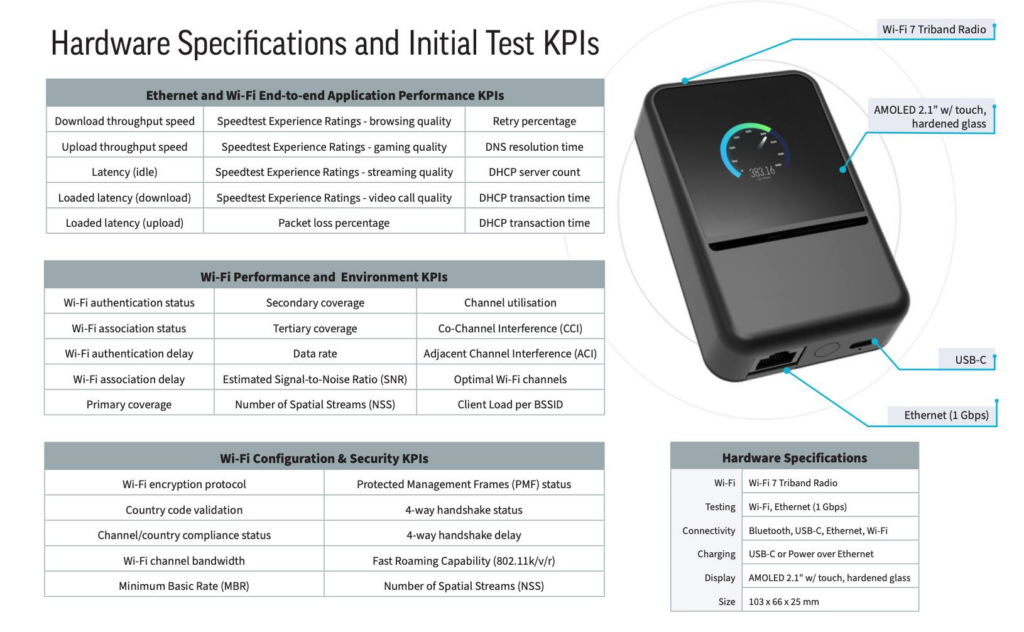
Ekahau Pulse with Speedtest Pulse App – Not yet announced
Speedtest Pulse is a different category. It is not primarily a traditional WLAN engineer’s survey instrument. It is a network validation and troubleshooting device intended to put more diagnostic power into the hands of ISPs, enterprise IT teams, and field technicians. Speedtest Pulse is a dual-mode diagnostic tool for one-tap smartphone-based validation and troubleshooting, plus autonomous testing of network performance and user experience.
That distinction matters. The classic WLAN professional wants raw details. The field organization wants repeatability, recommendations, and fewer escalations. Speedtest Pulse appears to target the gap between overly simple phone apps and expert-only RF tools. For distributed enterprise, managed service provider environments, that has real value. Not every site visit should require a senior CWNE-level engineer, especially in non-enterprise environments.
The benefit of this category is scale. You can hand a technician a guided workflow and get more consistent validation of wired backhaul, Wi-Fi performance, and user experience. The limitation is that guided diagnostics should not be confused with deep WLAN analysis. A tool that tells you what is probably wrong is not the same as one that lets you prove exactly why it is wrong at the protocol or RF layer. Then again, not everyone needs a Peter Mackenzie-level of frame analysis.
This combination also produces a very detailed and extensive reporting.
Though I do not think the ‘recommendations’ are appropriately scoped for enterprise deployments. I’m assuming when this is publicly released they’ll offer various ‘profiles’.
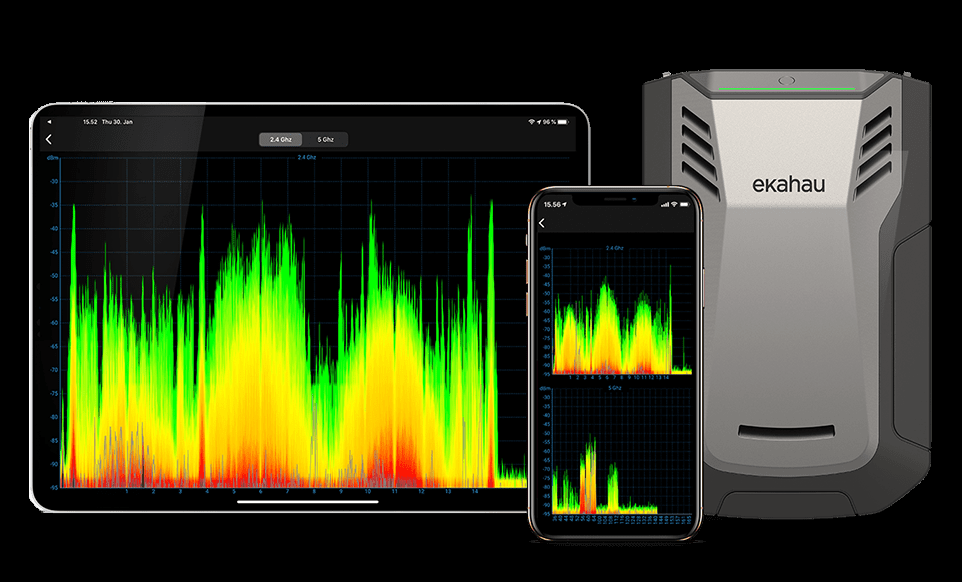
Ekahau Sidekick 2 with Survey App and Analyzer App – $6,690
The Ekahau Sidekick 2 remains the benchmark for survey-grade measurement in many enterprise Wi-Fi workflows. Its feature set includes 2.4, 5, and 6 GHz survey and spectrum analysis, four enterprise-grade tri-band Wi-Fi radios, nine custom wideband 3D antennas, a 50 sweeps-per-second spectrum analyzer, all-day battery life, and USB-C connectivity.
The power of the Sidekick 2 is not merely its hardware. It is the combination of measurement, Ekahau Survey, Ekahau Analyzer, Ekahau AI Pro workflows, cloud sharing, reporting, and the installed base of WLAN professionals already trained around the Ekahau model. Survey for iOS is specifically positioned around connecting a Sidekick to an iPhone or iPad, importing projects, walking surveys, and uploading results for review or team aggregation.
Ekahau Analyzer adds another operational dimension. The app integrates Speedtest by Ookla and can pair throughput testing with real-time spectrum and network configuration insight when used with Sidekick 2. That is useful because a raw speed test without RF context can be dangerously misleading.
The Sidekick 2 is a tool that delivers enterprise design validation, post-install surveys, design remediation, or when the client expects a formal report based on a mature methodology. The downside is cost, ecosystem commitment, and physical size compared with newer pocketable tools. It is not the fastest answer to every question, but it remains one of the most defensible answers for formal Wi-Fi work.
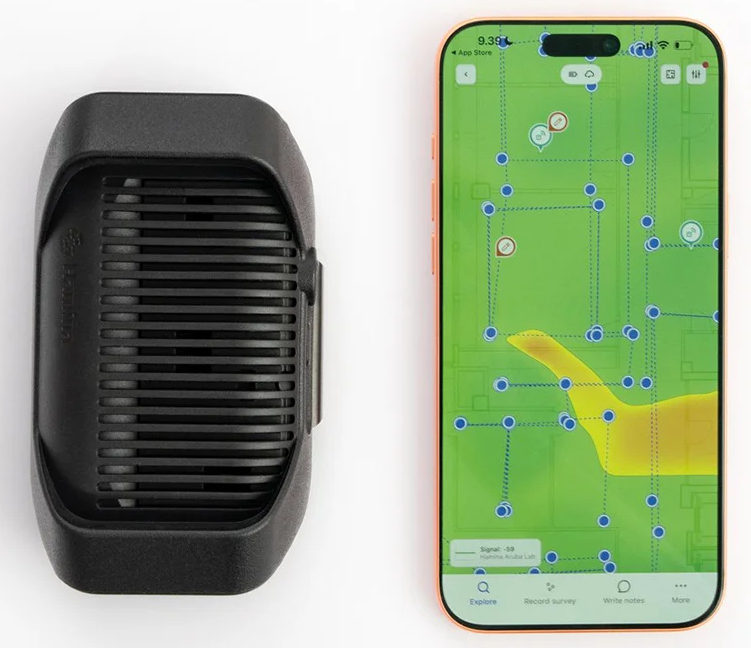
Hamina Clip with Hamina Onsite – $1,180
The Hamina Clip paired with Hamina Onsite is aimed squarely at the modern mobile survey workflow. The Clip is designed as a compact Wi-Fi site survey and troubleshooting device with 2.4, 5, and 6 GHz support, two Wi-Fi adapters for scanning, four antennas, BLE or USB-C connectivity to an iPhone or iPad, and over half a day of battery life according to Hamina’s published specs. Hamina lists compatibility with Hamina Onsite, WiFi Explorer Pro/Pi, Airtool, and MetaGeek workflows, which makes it more interesting than a single-purpose dongle.
With Hamina Onsite, the value is speed and workflow simplicity. The app is designed to measure networks, produce heatmaps, validate, troubleshoot, and update coverage, SNR, secondary coverage, tertiary coverage, and interference views live while walking. Hamina also emphasizes offline operation with later cloud synchronization, which matters when working in manufacturing, healthcare, campuses, or ugly temporary deployment environments where Internet access is not guaranteed.
The Clip/Onsite pairing is not trying to be the heaviest lab instrument in the room. Its benefit is mobility, fast feedback, low friction, and making survey data collection feel natural on iOS. For a consultant who needs repeatable site survey data without wanting to carry a Sidekick-class device for every small job, this is compelling. Its limitation is also its positioning: it is optimized for practical survey and troubleshooting, not necessarily for multiple channel packet analysis or full raw RF spectrum analysis.
No cable is necessary in this setup, the Hamina Clip easily shares data over a BLE connection.
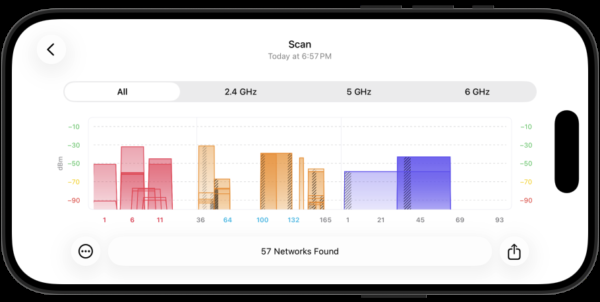
Hamina Clip with WiFi Explorer Pi – $1,230
This same Hamina Clip becomes a different tool when paired with WiFi Explorer Pi. In this mode, I would think less “survey heatmap” and more “mobile Wi-Fi intelligence.” WiFi Explorer Pi provides real-time scanning and analysis from an iPhone or iPad using external sensors, showing nearby networks, security, channel usage, signal strength, supported capabilities, vendor information, transmit power, Wi-Fi modes, spatial streams, country settings, beacon details, airtime, intervals, and information element breakdowns.
This is valuable because many WLAN professionals do not always need a full survey. Sometimes we need to stand in a hallway and answer very specific questions: Is this SSID actually on 6 GHz? Is the BSSID naming what I expect? Are APs advertising the correct country code? Is the MCS or spatial stream capability consistent with the deployment intent? Are there unexpected SSIDs, legacy rates, or odd beacon intervals? WiFi Explorer Pi is excellent for that investigative workflow.
This app also has our WLAN Pros Wi-Fi Checklists built in, for very fast analysis and comparison against a pre-defined set of requirements.
The Hamina Clip/WiFi Explorer Pi combination is therefore a lightweight professional analyzer, not just a casual scanner. It will appeal to engineers who already appreciate WiFi Explorer Pro on macOS and want that kind of visibility while walking around with an iPhone. The benefit is fast beacon and configuration truth. The tradeoff is that it is not, by itself, the same as a full survey/reporting workflow. WiFi Explorer Pi 1.2, released July 31, 2026, added the Clip over BLE, so scanning no longer needs the cable. Airtool Pi is still USB-C only, so packet capture with the Clip remains a wired workflow.
You can also do frame captures with Intuitibits AirTool Pi along with the Hamina Clip!
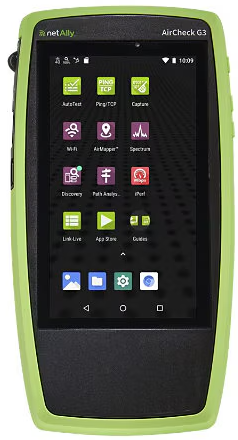
NetAlly AirCheck G3 – $4,195
NetAlly AirCheck is the purpose-built handheld option. The current AirCheck G3 Pro is positioned as a Wi-Fi 6 and Wi-Fi 7 wireless tester for professional-grade analysis, site surveys, Bluetooth/BLE, deployment validation, troubleshooting, security audits, and remote collaboration. The AirCheck offers real-time Wi-Fi 7 visibility including MLO, wider channels, WPA3, and 6 GHz utilization, plus optional 2.4/5/6 GHz spectrum analysis with the NXT-2000.
The AirCheck’s strength is operational troubleshooting. It is rugged, self-contained, and built for technicians who need to validate connectivity, DHCP, DNS, gateway response, channel utilization, roaming, AP/client location, and problem detection without building a full design project. It offers a tri-band Wi-Fi testing with 802.11ax/ac/a/b/g/n support and 2.4, 5, and 6 GHz frequency ranges where permitted.
This is the tool I would want in the hands of distributed field teams. It may not replace a full design/survey platform, but it can reduce escalations and produce consistent evidence from the field. It can be used to do more of a ‘stop-n-go’ type survey to document Wi-Fi coverage validation with the NetAlly Link-Live cloud service.
nOversight App – $28
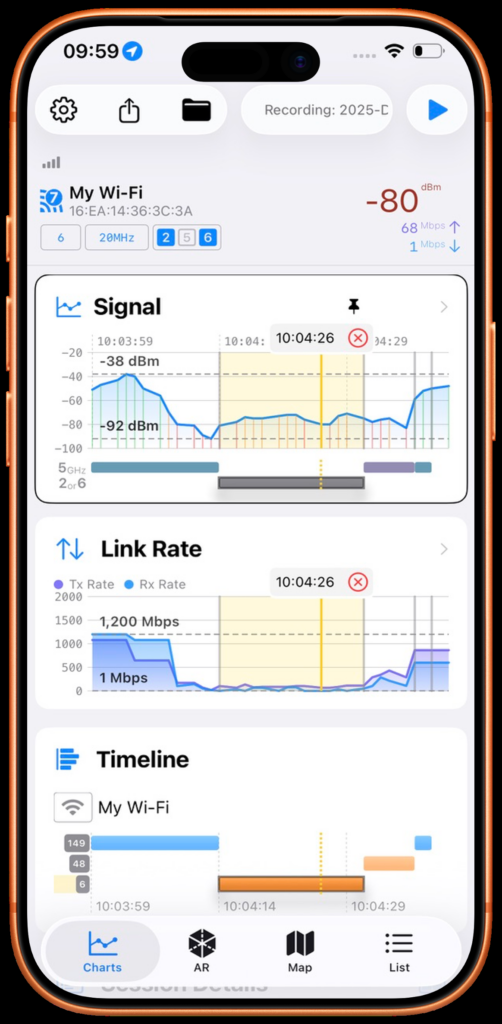
nOversight is another example of squeezing more operational value out of Apple devices. It focuses on showing how the Apple device itself experiences Wi-Fi, using the built-in Wi-Fi hardware without extra adapters. It provides walk-around signal strength, link rate, latency, congestion and retries, AR overlay, map views, saved walk tests, log ingestion, SNR, retry analysis, roaming and steering insight, CSV export, and deeper Mac views depending on license level.
The most important phrase is “device’s point of view.” A phone-only app cannot replace an external scanning radio, but it can tell you what the actual client is living through. For many real-world problems, that is exactly the missing perspective. When Apple clients are the complaint source, testing with an Apple client is not a compromise; it is the point.
This app brings a wealth of network details to the forefront.
Oscium Nomad with Hamina Onsite – $2,180
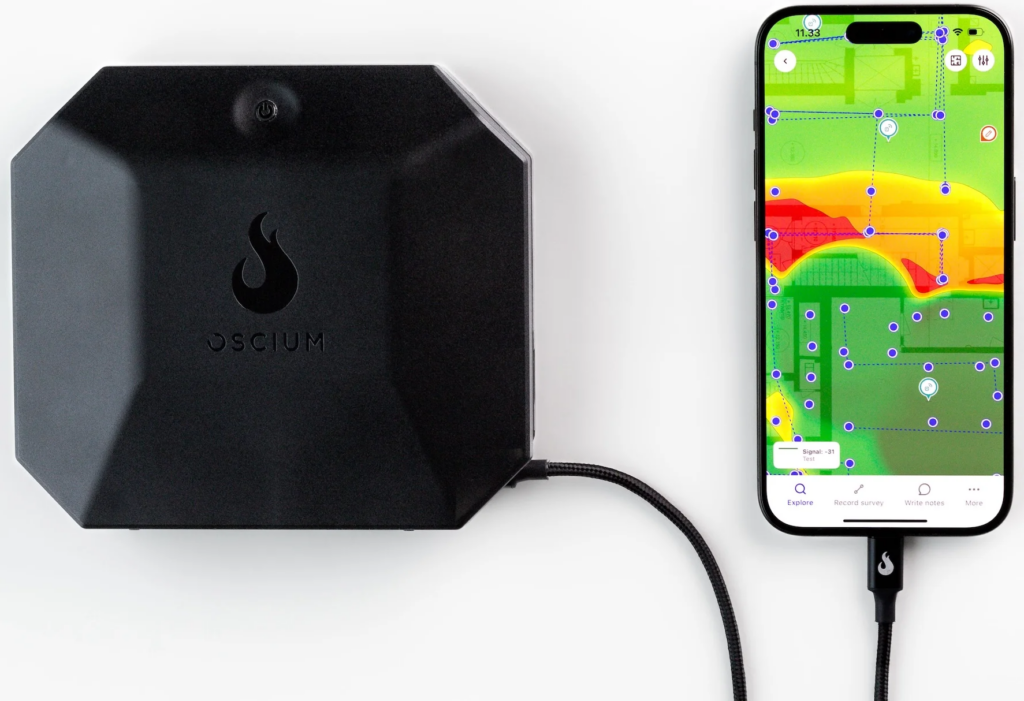
The Oscium Nomad with Hamina Onsite sits closer to the heavier-duty end of the mobile survey category. Nomad is a wearable, battery-powered Wi-Fi measurement device with four simultaneous radios: three 802.11ax radios and one 802.11be radio. It supports 2.4, 5, and 6 GHz, parallel channel monitoring, roaming event visibility, and up to four hours of continuous use. Oscium also describes it as application-agnostic, compatible with Hamina Onsite, MetaGeek App, Airtool Pi, and Airtool 2.
Compared with the Clip, Nomad gives you more radios and broader simultaneous observation. That matters in dense deployments, multi-band environments, and roaming investigations where channel-hopping blind spots can affect interpretation. Four radios do not magically solve every measurement problem, but they do reduce the compromises inherent in trying to observe a multi-band WLAN through a narrow straw.
With Hamina Onsite, Nomad becomes a strong professional survey platform. Hamina Onsite plus Nomad makes for a professional Wi-Fi site survey toolkit that records and visualizes measurements as heatmaps, including live coverage and interference views. The Nomad can be extended with compatible spectrum hardware for real-time spectrum analysis, and that four-channel packet captures can be performed with Intuitibits Airtool 2. The Nomad can allow for real spectrum analysis using an Oscium Lucid or a NetAlly NXT-2000.
For WLAN professionals, Nomad feels like a serious path: more capable than a phone-only workflow, lighter and more flexible than traditional laptop-centered survey rigs, and less locked into one software ecosystem than some historic survey platforms.
Ubiquiti WiFiMan Wizard with WiFiMan App – $99
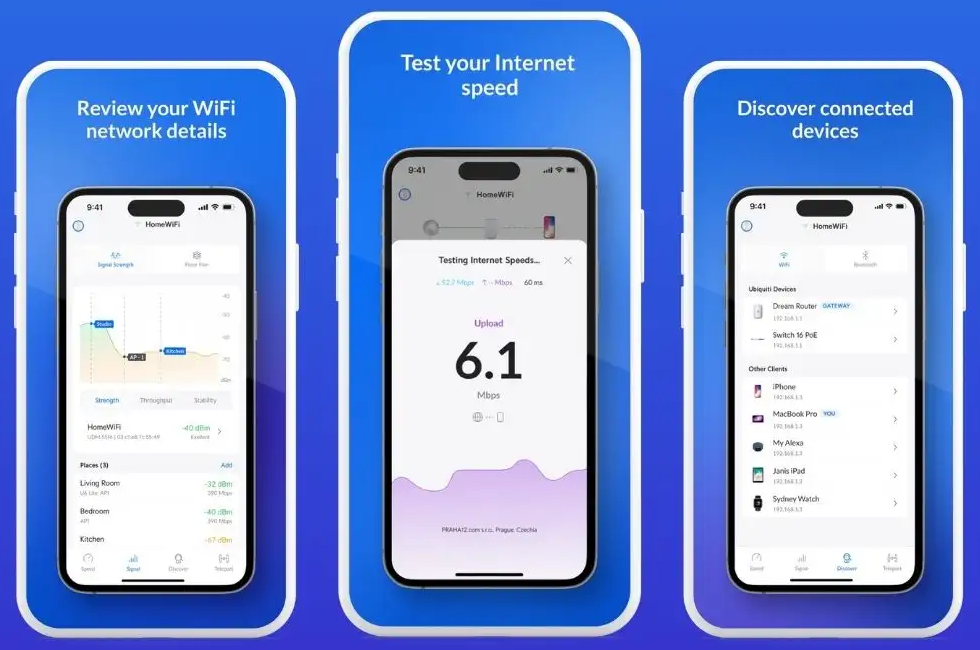
The Ubiquiti WiFiMan Wizard is a very different value proposition: low cost, small size, and simple Wi-Fi visibility. The WiFiMan app comes in iOS and Android flavors with 2.4 and 5 GHz unlicensed band scanning, hours of continuous scanning battery life, BLE pairing, USB-C charging, and MagSafe-style iPhone attachment support. Its 2.4GHz and 5GHz, but no 6 GHz support. (Yet…)
For the price and portability, this is a useful “always in the bag” tool. It can help explain a channel activity, and basic RF patterns to customers or junior staff. The limitation is obvious: it is not tri-band, not survey-grade, and not aimed at formal enterprise WLAN deliverables. I see it as a fast sanity-check device, not a replacement for professional survey or analysis platforms. Though it provides both Wi-Fi scanning services as well as client throughput testing.
This tool combination is especially valuable when working on a Ubiquiti network – with additional information available when the WiFiMan app can talk with the Ubiquiti infrastructure.
Wi-Fi Check App – $80
iPhone-only tools have improved substantially, but they remain constrained by iOS. Apple’s own developer guidance states that iOS does not provide a general-purpose Wi-Fi scanning and configuration API, though it does provide special-purpose Wi-Fi APIs; Apple’s internal API can fetch information about the current network such as SSID, BSSID, and security type.
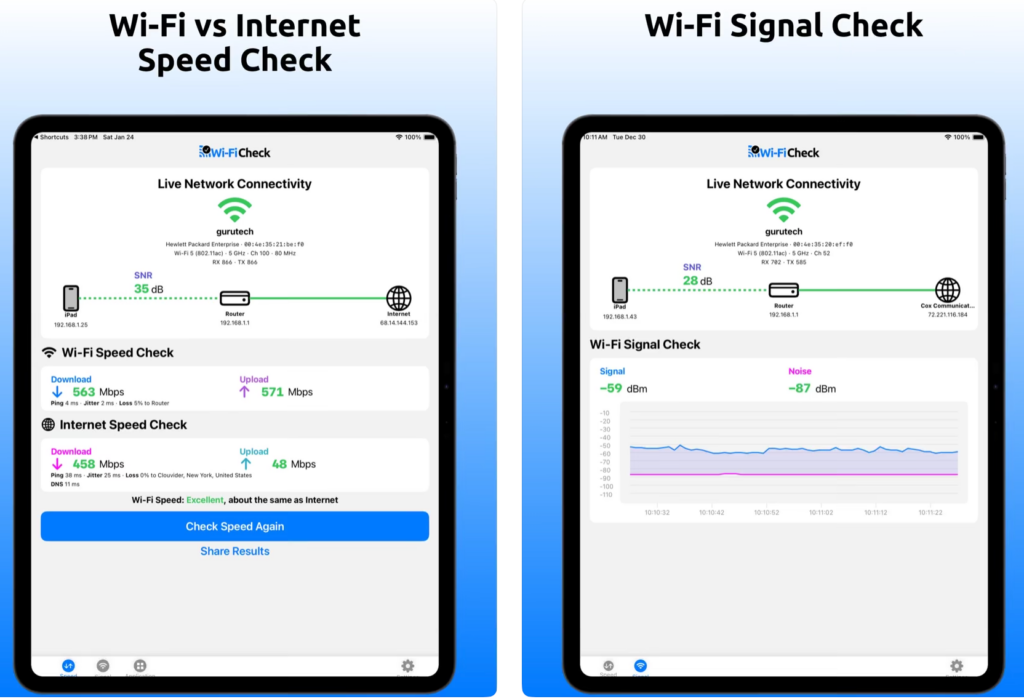
Wi-Fi Check works within that world. It focuses on distinguishing Wi-Fi performance from Internet performance, testing local network versus Internet quality, checking ping, jitter, packet loss, DNS response time, application reachability, and showing signal, noise, SNR, and PHY rates from an iPhone or iPad without external sensors.
That is useful, especially because many real tickets are not pure Wi-Fi tickets. They are “Teams is bad,” “the cloud app is slow,” “the Wi-Fi is broken,” or “it works in one room but not another.” Wi-Fi Check is best as a client-experience tool: what does this Apple device experience right now, and can we separate WLAN from LAN, WAN, DNS, or application issues?
WLAN Pi Go with WiFi Explorer Pi App – $600
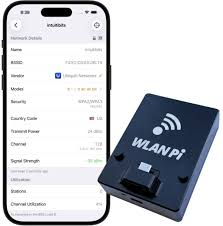
The WLAN Pi Go with WiFi Explorer Pi is one of the more interesting enthusiast-professional crossovers. The WLAN Pi Go magnetically attaches to a phone and supports Wi-Fi scans or frame captures using mobile apps; Wi-Fi scanning is enabled on USB-C iPhones and iPads through WiFi Explorer Pi.
This pairing brings the WLAN Pi ethos into a cleaner mobile form factor. WiFi Explorer Pi gives the professional a rich scanning interface, while the WLAN Pi Go provides the external radio visibility iOS cannot normally provide on its own. For engineers who care about details in beacon frames, capabilities, channel plans, and AP identity, this is a highly useful pocket tool.
Its best use is quick analysis, validation, and education. It is excellent for answering “what is really being advertised here?” It is less ideal as the only tool for a formal enterprise survey unless paired with a broader methodology and reporting workflow.
You can also do frame captures with Intuitibits AirTool Pi along with the WLAN Pi Go!
At a Glance: Capability Matrix
The table below summarizes what each combination is built to do. Use it as a quick reference, not a substitute for the discussion above — the fit of a tool to the problem in front of you matters more than any single checkmark. Of course, you also have to look at the costs differences between these tool options.
| Tool / Combination | MSRP | Passive Scan | Spectrum Analysis | Active Throughput | Survey / Heatmap | 6 GHz | Best For |
|---|---|---|---|---|---|---|---|
| Hamina Clip + Hamina Onsite App | $1,180 | ✓ | — | ✓ | ✓ | ✓ | Onsite validation |
| Hamina Clip + WiFi Explorer Pi App | $1,230 | ✓ | — | ◐ | — | ✓ | “What’s on the air?” visualizations |
| Oscium Nomad + Hamina Onsite App | $2,180 | ✓ | ◐ via Lucid /or NXT-2000 | ✓ | ✓ | ✓ | Survey plus non-Wi-Fi interference hunting |
| Ekahau Sidekick v2 + Survey / Analyzer Apps | $6,690 | ✓ | ✓ | ✓ | ✓ | ✓ | Wi-Fi Survey + Spectrum Analysis |
| Ekahau Pulse + Speedtest Pulse App | N/A | ◐ | — | ✓ | — | ✓ | Client-experience and performance |
| WLAN Pi Go + WiFi Explorer Pi App | $600 | ✓ | ◐ via Oscium Lucid | ✓ | — | ✓ | “What’s on the air?” visualizations |
| Ubiquiti WiFiMan Wizard + WiFiMan App | $99 | ✓ | — | ✓ | — | — | Affordable scanner |
| Wi-Fi Check App | $80 | — | — | ✓ | — | ✓ (capable iPhone) | Wi-Fi vs. Internet throughput from the client |
| nOversight App | $28 | ◐ | — | ✓ | — | ✓ (capable iPhone) | Client diagnostics with AR overlay |
| NetAlly AirCheck G3 | $4,195 | ✓ | — | ✓ | — | ✓ | Fast field verdict; hand-to-any-tech tool |
Legend: ✓ Built-in / supported ◐ Partial or via add-on — Not supported
A Decision Framework
When the Wi-Fi is misbehaving, I work down this short list before I reach into the set of tool options:
Actually – my FIRST step is to see what I even have with me.. .At all times I have my iPhone, so that is the minimum. But if I have any one of the other hardware tools with me I may start down the list below.
- What am I being asked to prove? Coverage, interference, roaming, throughput, or “it’s broken”? The answer drives everything else.
- Passive or active? A scanner tells you what’s on the air. A performance tool tells you what the user actually experiences. Most real problems eventually need both, but rarely at the same moment.
- Wi-Fi or not-Wi-Fi? If the Spectrum Analysis matters, you need real spectrum — a Sidekick, a Nomad with attached SpecAn. But usually this question is more about Wi-Fi compared with Internet backhaul. Any tool that shows you MCS, combined with any Internet Throughput Testing utility can help. The Wi-Fi Check app has this built-in.
- How quickly do I need an answer? A standalone AirCheck gives you a verdict in seconds. An iPhone with nOversight also takes mere seconds. An Ekahau Survey or Hamina Onsite gives you a report in a little more time. Both are right, for different situations.
- Who is holding the tool? A field tech, a help-desk escalation, or a CWNE — the right tool is the one the person carrying it can actually use well.
- What does the deliverable look like? If you are handing a report to a customer, the tool that produces it should be the one in your hand. If you are just satisfying your own curiosity, anything that answers the question is fine.
Note: I have no problem NOT giving a customer a written report, in fact, I no longer even offer reports. I only meet and go over results together. I’ve found customers want their Wi-Fi FIXED… not a report on why it isn’t working properly!
Final Recommendation
For formal design validation and repeatable enterprise reporting, Ekahau Sidekick 2 remains the heavyweight, not only in its cost, but also physical weight, and installed base. For modern mobile surveys with a lighter operational footprint, Hamina Onsite with either Clip or Nomad is extremely attractive, with Nomad offering more simultaneous radio capability and Clip offering a smaller, simpler carry. For beacon-level truth and mobile Wi-Fi inspection, WiFi Explorer Pi with WLAN Pi Go or Hamina Clip is the kind of tool serious WLAN professionals will use constantly. For inexpensive Wi-Fi sanity checks, WiFiMan Wizard is useful but limited. For client-experience validation on Apple devices, Wi-Fi Check and nOversight fill an important gap. For frontline troubleshooting at scale, AirCheck remains a strong purpose-built handheld.
The Honest Truth
There is no single handheld that does everything, and there shouldn’t be. The combinations above exist because the problems are genuinely different. A modern WLAN kit usually contains two or three of these tools, chosen deliberately, Wi-Fi validation survey tool, a Wi-Fi scanner you trust and know how to read the results, a spectrum-capable device for the rare times real Spectrum Analysis matters, and a client-perspective tool for the complaints that never show up on a scan. Wi-Fi has become too important, too client-specific, and too operationally visible for us to keep pretending a single device can answer every question.
Buy for the problem in front of you, not what the tools marketing folks touted at their last vendor booth. The Wi-Fi doesn’t care which logo is on the tool’s case, it only cares whether you brought enough information to ask the right next question.
The Real Truth
The real truth is that you need the KNOWLEDGE of how Wi-Fi works to take advantage of any of these tools! That is what you should focus on first before choosing any tool.